Your download is almost ready
Download starts in 5 s.
If the download does not start, use the button below.
Download now
Original file: korean-wallpaper-architecture-155.jpg
Back to the photo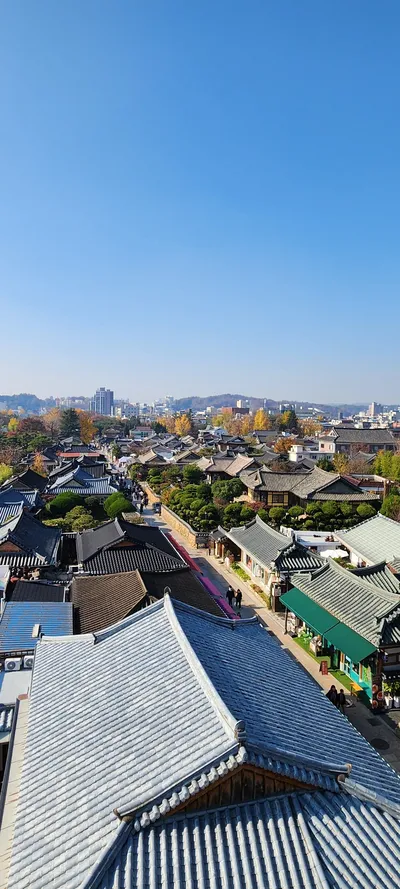
About this photo
Photographed at Hanji-gil, Pungnam-dong 3-ga, Jeonju-si in November 2024
Seen from an elevated vantage, the narrow main alley of Jeonju Hanok Village cuts through the neighborhood, lined with visitors walking between traditional buildings that have been converted into cafes, craft shops, and guesthouses. The rooftops in the foreground are in crisp detail, showing the geometry of Korean tile roofing, the curved ridge tiles, the repeating pattern of concave and convex tiles, and the upturned eave corners. Green awnings and trimmed hedges add color between the gray roofs, and the composition runs from the close roof detail in the lower left diagonally across to the distant cityscape of modern Jeonju and its surrounding hills. Late November trees in gold and orange punctuate the roofscape, their autumn color a warm accent against the cool gray of the tiles. The portrait orientation shows the depth of the village from foreground to horizon and how the traditional quarter sits inside a modern Korean city. The Hanji-gil area of Pungnam-dong in Jeonju lies below the viewpoint.
Setting it as your wallpaper
On a phone, open the saved photo in your gallery or Photos app and choose the wallpaper option from the share or more menu.
On a computer, open the desktop background settings and pick the downloaded file.
Personal use
The photo is free to use as a wallpaper on your own devices. Selling, redistributing or using it in commercial work is not allowed. Terms of use